
For those of you using SeeYou (DQ and Jay), I've been very disappointed with the maps that come with the program and the limited resolution available that they offer for download. The maps with CompeGPS are better but I don't have that anymore.
I decided to create my own from GE (Google Earth) and then calibrate them. They are offered here, calibrated and converted to the SeeYou (CMR) format.
SeeYou San Gabriel Range
Enjoy
Hi-Res SeeYou Map Files for San Gabriel Range
Moderator: Chip

Thanks Chip!!
It works well in track view but in 3D view the image becomes very blurry and loses most of its resolution. I noticed the cmr files were huge. As I understand it, SeeYou has a resolution limit of 2048 px per cmr tile. At least that's the way it works in v3.95 which is all I can afford.
If we were to take the full jpg image of the San Gabriels and cut it up into 2048px x 2048px tiles and convert these to cmr files we should get much higher resolution in 3D view. But I know from doing the 2013 world's tracks what a PITA it is t
Do you have the plain jpg file available for download? Maybe I can cut it up and make cmr tiles that work better in 3D view?
It works well in track view but in 3D view the image becomes very blurry and loses most of its resolution. I noticed the cmr files were huge. As I understand it, SeeYou has a resolution limit of 2048 px per cmr tile. At least that's the way it works in v3.95 which is all I can afford.
If we were to take the full jpg image of the San Gabriels and cut it up into 2048px x 2048px tiles and convert these to cmr files we should get much higher resolution in 3D view. But I know from doing the 2013 world's tracks what a PITA it is t
Do you have the plain jpg file available for download? Maybe I can cut it up and make cmr tiles that work better in 3D view?
I have 4.13 and version 5.1 and did this based on both of them being able to display 8k (8192) and set the terrain quality to very high. I do have a 1Gb video card so I can handle the larger terrains with little issue (although it does take a few minutes to render).
Here's a quick preview
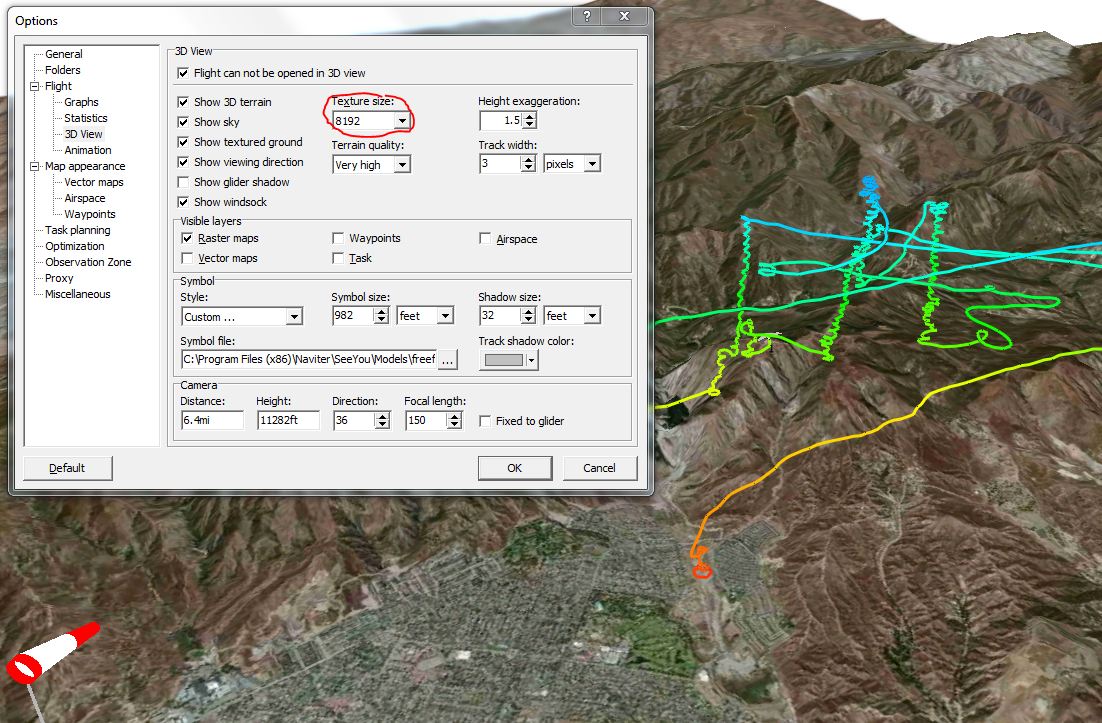
I might be able to zoom in to 17 on GE (for these I used a zoom level of 16), to see if the 3d plays any better.
SeeYou does quite a bit of compression during the cmr conversion, the original files were about 120M - 150M.
Here's a quick preview
I might be able to zoom in to 17 on GE (for these I used a zoom level of 16), to see if the 3d plays any better.
SeeYou does quite a bit of compression during the cmr conversion, the original files were about 120M - 150M.
